
Introduction to the MITS Altair 8800 Front Panel
The Altair 8800 Front Panel is one of the most iconic interfaces in early personal computing. Long before graphical operating systems, keyboards, and monitors became standard, computers were often operated directly through rows of switches and blinking lights. Understanding the Altair front panel provides insight into how early microcomputers functioned and how programmers interacted with hardware at the lowest level. You can get the Altairduino kit from adwaterandstir.com. The kit took me about a day or so to assemble.
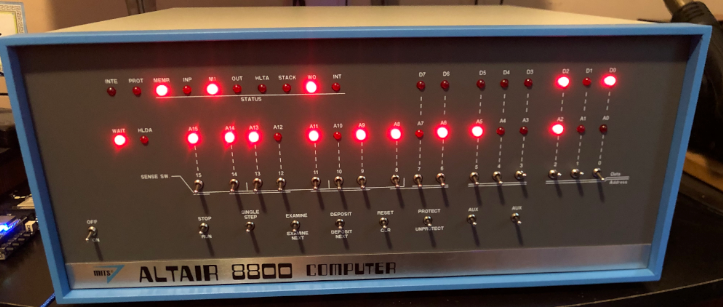
The Purpose of the Altair 8800 Front Panel
The front panel of the Altair 8800 was designed to allow direct control of the computer’s memory and processor. It acts as a manual interface to the system’s bus, enabling the user to enter machine code instructions, examine memory locations, and control program execution.
Instead of typing commands into a terminal, the user toggles switches to represent binary numbers. Each switch corresponds to a single bit, meaning it can represent either a 0 or a 1. When multiple switches are used together, they form an 8-bit byte or a 16-bit address.
This approach may seem tedious by modern standards, but in 1975 it was a practical way to interact with a computer without requiring expensive peripherals.
Address and Data Switches
The Altair front panel contains two primary sets of switches: address switches and data switches.
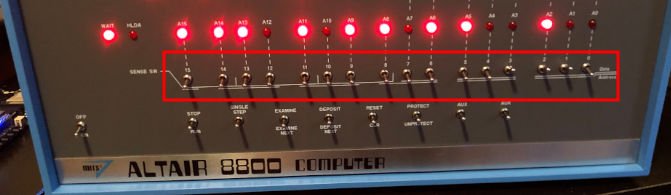
The address switches represent the memory location that the user wants to work with. By setting these switches, the user selects a specific memory address in the system.
The data switches represent the value that will be stored in that memory location. Once the switches are set, the user presses the Deposit or Deposit Next button to store the data byte into memory.
For example, if a programmer wanted to store an instruction at address 0000, they would first set the address switches to that value. Then they would set the data switches to the binary representation of the instruction and press Deposit.
Repeating this process allows an entire program to be manually entered into memory.
Status Lights on the Altair 8800 Front Panel
Above the switches are rows of LEDs that display the internal state of the computer. These lights show information such as:
- The current address on the bus
- The data being transferred
- Processor status signals
- Whether the CPU is reading or writing memory
As a program runs, the lights blink rapidly, reflecting the activity of the processor and memory system. Experienced users can sometimes diagnose problems simply by observing these patterns.
Control Switches
The Altair front panel also includes several control switches that manage system operation. Some of the most important include:
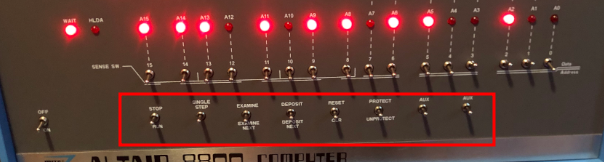
Run – Starts program execution.
Stop – Halts the processor.
Single Step – Executes one instruction at a time.
Examine – Displays the contents of the selected memory address.
Deposit – Stores the data switch value into memory.
Single stepping is particularly useful for debugging, allowing programmers to watch the machine execute each instruction and observe how the system state changes.
Learning the Hardware
Working with the Altair front panel teaches fundamental concepts of computing that are often hidden by modern software layers. Users gain direct exposure to binary numbers, memory addressing, and processor execution.
Because every instruction must be entered manually, programmers develop a deeper understanding of machine language and how the CPU processes instructions step by step.
A Window Into Early Computing
The Altair front panel represents a time when computing was closely tied to hardware. Every switch and LED directly corresponded to signals on the computer’s internal bus.
While modern systems rely on sophisticated interfaces and operating systems, the Altair front panel reveals the underlying simplicity of a computer: a processor reading instructions from memory and manipulating data one bit at a time.
For enthusiasts and historians, learning how the Altair front panel works provides a fascinating glimpse into the origins of the personal computer revolution.
For more information, see the article on the Altair 8800 front panel programming!
— Ricky Bryce