Altair 8800

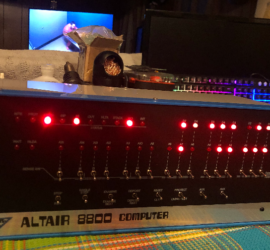
The Altair 8800 computer was the first “successful” personal computer, with 25,000 units sold.

You can purchase a replica of one of these units from adwaterandstir.com.

Another option is to build your own, although it’s much easier to purchase the kit, and will look much nicer too.

You can program the Altair 8800 from the front panel switches.  At first, this is how most users would originally program the machine.  Terminals became less expensive, and more widely used.  At this point, users would operate this computer in a more modern way.

The Altair had 8 inch floppy drives, but of course the 5 1/4 disks came out shortly after (called a mini-disk).  You could even run Hard Drives.  In this case, 4Mb is a lot of hard disk storage.

A common operating system for the Altair is CP/M (Control Program/Monitor).   If you use the command prompt in windows, or have ever used DOS (Disk Operating System) you will have no problem with CP/M.  A lot of the ideas from CP/M are in DOS.

By using CP/M, you will be able to run programs such as WordStar, or SuperCalc.  These are an early word processor and spreadsheet.

With a WIFI modem, you will even be able to connect to the Internet.  I use IMP Modem Executive to connect to telnet BBS (Bulletin Board Systems.)


Configuring Xmodem Gateway

Introduction: Configuring Xmodem Gateway Configuring Xmodem Gateway is done through a single file called xmodem.conf, located in the same directory as the server binary. If the file does not exist when the server starts, it will create a default copy automatically. The format is straightforward: one key=value pair per line, Read More »
Configuring Xmodem Gateway

Understanding the Altair 8800 Front Panel

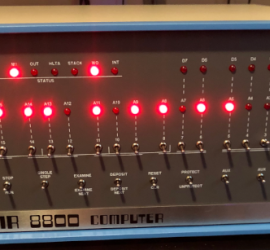
Introduction to the MITS Altair 8800 Front Panel The Altair 8800 Front Panel is one of the most iconic interfaces in early personal computing. Long before graphical operating systems, keyboards, and monitors became standard, computers were often operated directly through rows of switches and blinking lights. Understanding the Altair front Read More »

Altair 8800 Front Panel

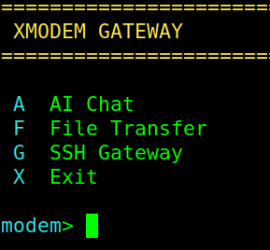
XMODEM Gateway: File Transfers and SSH for Retro Hardware

Introduction to XMODEM Gateway If you have a Commodore 64, an AltairDuino running CP/M, or any terminal that speaks telnet, XMODEM Gateway gives you file transfers, SSH access to remote servers, and AI chat — all from a single telnet connection. I’ve tested this with IMP8 on the Altairduino. IMP8 Read More »

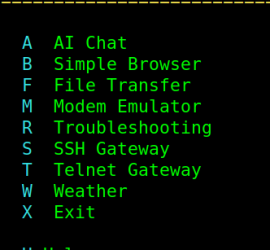
XMODEM Gateway opening screen

Using UNZIP on the Altair

Introduction to Using UNZIP on the Altair Duino Using UNZIP on the Altair allows you to zip multiple files on another machine. Once you zip a series of files, they become one file with the .ZIP extension. That way, you only need to transfer one file over XMODEM. Not only Read More »

Using UNZIP on the Altair

Altair BASIC Stopwatch

Introduction to the Altair BASIC Stopwatch In this section, we’ll write an Altair BASIC Stopwatch. Basically, we’ll use the first sensor input (switch 8) to start and stop the watch. When we turn on switch 8, the stopwatch will start. After that, if we shut off switch #8, the clock Read More »

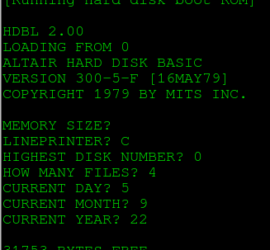
Booting to Altair BASIC

Altair Front Panel Programming

Introduction to Altair Front Panel Programming Altair Front Panel Programming allows us to enter a program using the front panel switches. In the early days of computers, terminals were expensive. Most of those who were building the Altair 8800 would enter a program through the front panel switches. The advantage Read More »

Altair Front Panel

The Meaning of TRON

Introduction to The Meaning of TRON When some of us think of The Meaning of TRON, we think of a movie with cartoon-like motorcycles. For others, we think of TRON as being part of the name of a machine with lots of gadgets from an old black and white SciFi Read More »

Altair 8800

BASIC READ DATA RESTORE

Introduction to BASIC READ DATA RESTORE The BASIC READ DATA RESTORE command allows you to easily set up data that you use in a program. BASIC was one of the early “High Level” programming languages. In other words, you don’t need to know much about how the computer itself operates. Read More »

BASIC READ DATA RESTORE

BASIC Input Command

Introduction to the BASIC Input Command In this post, we’ll cover the BASIC Input Command. In our last post, we discussed the FOR NEXT loop. This allowed us to calculate our salary for the next 10 years. Our variables were coded into the program. Obviously, though, we would want to Read More »

BASIC INPUT Command

BASIC For Next Loop

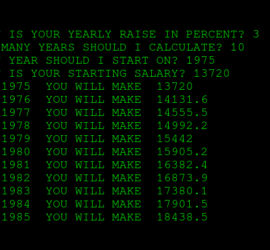
Introduction to Altair BASIC For Next Loop In this section, we’ll discuss the Altair BASIC For Next Loop. Manipulating variables is an important part of any programming language. For this example, let’s go back to 1975. The median pay was $13,720 per year. We’ll assume that you signed a contract Read More »

Calculate Wages