
Introduction: Connecting to TelnetBible.com
TelnetBible.com is a unique online service that allows users to read and explore the Bible through a classic telnet interface. Telnet was one of the earliest methods of interacting with remote computers over the internet, long before modern web browsers existed. By combining this historic technology with scripture, TelnetBible provides a fast, lightweight, and distraction-free way to read the King James Bible from almost any computer.
Telnet is not an inherently secure protocol, however, no username or password is required to read the Bible and play online games. By signing up, you will have more options, but because of this insecurity, be sure to use a unique password that you don’t use for anything else. Another option is to use SSH, which is much more secure. Still, though, always use a unique password on any site you visit!
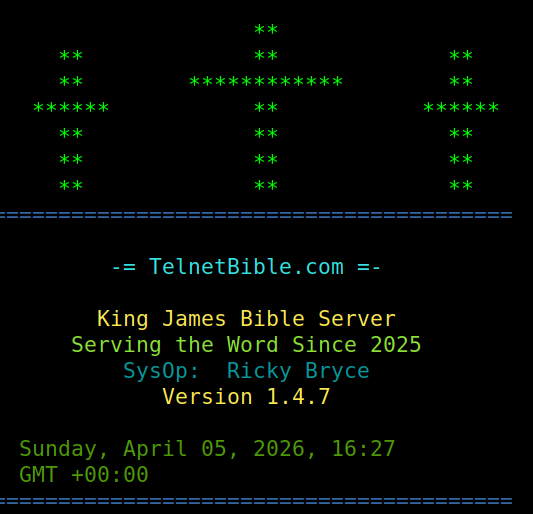
You can find more information about connecting on the TelnetBible website.
What You Need to Get Started for connecting to TelnetBible.com
To connect to TelnetBible.com, you only need two things:
- An Internet connection
- A telnet client such as PUTTY. Another option is to use your command prompt or terminal for SSH.
Many operating systems already include a telnet or SSH client. If not, they allow one to be installed easily. For example:
- Linux: Telnet is commonly available through the terminal using the
telnetcommand. SSH with the ssh command. - macOS: Telnet can be installed using package managers such as Homebrew. Again, use SSH with the ssh command.
- Windows: Telnet can be enabled through the Windows Features settings or accessed through third-party clients. Still, you can use SSH with the ssh command.
Because telnet is text-based and extremely lightweight, TelnetBible works well even on older computers, embedded systems, or minimal operating environments.
Connecting to TelnetBible
Once a telnet client is available, connecting is very simple.
Open a terminal or command prompt and type:
telnet telnetbible.com 6400
OR
ssh guest@telnetbible.com  (initial password is: guest)

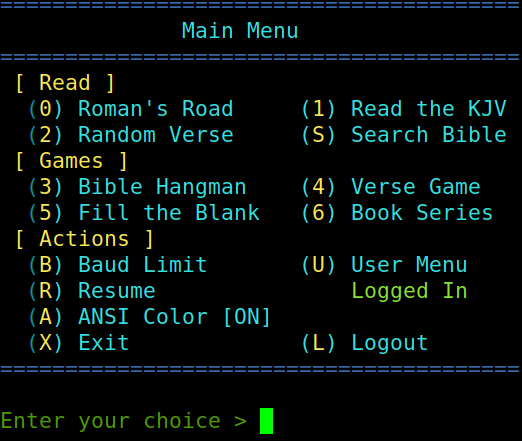
After pressing Enter, your computer will open a connection to the TelnetBible server. Within a few seconds, you will see the prompt to hit the backspace key. Answer the question about ANSI color (for most terminals, this defaults to (Y)es. The welcome screen will appear. This screen is a brief introduction to the service. Once you hit space, you will see the main menu, which should be very intuitive.
Because the system runs entirely in text mode, everything is controlled with keyboard commands rather than a mouse.
Navigating the Interface
After connecting, users can browse the Bible through a simple menu system. The interface is intentionally minimal so that it works on any terminal or telnet client.
Most interactions follow a few simple patterns:
- Selecting books of the Bible – The system presents a list of books. Users type the corresponding number or abbreviation to open the desired book.
- Choosing chapters – After selecting a book, the program prompts for a chapter number.
- Reading verses – Once a chapter is selected, the text of the chapter appears in the terminal window.
- If you are a guest use, you can save your place by creating a PIN. Logged in users can have many different bookmarks without a PIN.
Because the interface is entirely text-based, scrolling and reading are extremely fast. There are no graphics, ads, or other elements that might slow down the experience.
Searching and Navigation Features
TelnetBible also includes tools to make exploring scripture easier.
Users can typically:
- Jump directly to specific books, chapters, or verses
- Navigate forward or backward between chapters
- Return to the main menu
- Exit the program when finished
Commands are kept short, consistent and easy to remember. The interface remains simple and efficient.
Why Use a Telnet Bible?
While modern Bible websites provide rich graphical interfaces, a telnet-based system offers several unique advantages.
Speed: Telnet transfers only plain text, so pages load instantly.
Low bandwidth: The service works well even with very slow internet connections.
Compatibility: TelnetBible can run on nearly any device capable of opening a telnet connection, including vintage computers, terminals, and embedded systems.
Distraction-free reading: Without images, pop-ups, or advertisements, the focus remains entirely on the scripture.
For technology enthusiasts, the service also provides a nostalgic glimpse into how people interacted with remote systems in the early days of the internet.
Ending Your Session
When finished reading, exiting is simple. Most telnet applications allow users to quit by selecting the exit option from the menu or by closing the telnet session with a keyboard command such as:
Ctrl + ]
quit
This immediately disconnects from the TelnetBible server and returns the user to their local terminal.
Another option is to simply hit X at the main menu. This will disconnect your session.
A Unique Blend of Technology and Scripture
TelnetBible.com demonstrates how classic internet technology can still serve meaningful purposes today. By delivering the Bible through a lightweight telnet interface, it makes scripture accessible from virtually any system while preserving the simplicity of early network computing.
Whether you are a technology hobbyist, a retro computing enthusiast, or simply someone who appreciates a clean and distraction-free reading environment, TelnetBible offers a fascinating and practical way to explore the Bible online.
Logged in users will enjoy a file transfer menu, chat interface, and devotions for reading.
I’ve used this site extensively with the Altariduino from adwaterandstir.com. It also has a PETSCII interface for Commodore 64 users! Feel free to browse the site for other retro computers such as the IMSAI 8080 that I use to enjoy this site with!
— Ricky Bryce